# 5. Traffic lights
## 5.1 Overview
In this section, you will learn to light multiple LEDs and control the green, yellow, and red lights to light up at intervals
through a delay function to achieve the effect of a traffic light.
## 5.2. Working principle
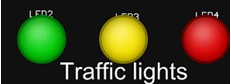 There are three colors of traffic lights, green light, yellow light and red light. The pins connected to the main control board
are 13/11/10. By controlling the high level of the three pins, the corresponding lights can be lit. A single light cycle is as
follows: first let the green light be on for a period of time, which means that the traffic is in a passable state, then flash a
reminder before the green light ends and switch to the yellow light, then switch to the yellow light, and wait for a short
period of time before switching to the yellow light. Switch to red light. The red light also waits for a period of time,
indicating that traffic is prohibited from passing, and flashes as a reminder before the red light ends and is ready to switch to
the green light.
So the single-cycle process is roughly as follows:
Leave the green light on for five seconds , the green light flashing every 500 milliseconds, the yellow light on for 1 second,
the red light on for 5 seconds, the red light flashing every 500 milliseconds, and so on.
## 5.3 Connection lines
There are three colors of traffic lights, green light, yellow light and red light. The pins connected to the main control board
are 13/11/10. By controlling the high level of the three pins, the corresponding lights can be lit. A single light cycle is as
follows: first let the green light be on for a period of time, which means that the traffic is in a passable state, then flash a
reminder before the green light ends and switch to the yellow light, then switch to the yellow light, and wait for a short
period of time before switching to the yellow light. Switch to red light. The red light also waits for a period of time,
indicating that traffic is prohibited from passing, and flashes as a reminder before the red light ends and is ready to switch to
the green light.
So the single-cycle process is roughly as follows:
Leave the green light on for five seconds , the green light flashing every 500 milliseconds, the yellow light on for 1 second,
the red light on for 5 seconds, the red light flashing every 500 milliseconds, and so on.
## 5.3 Connection lines
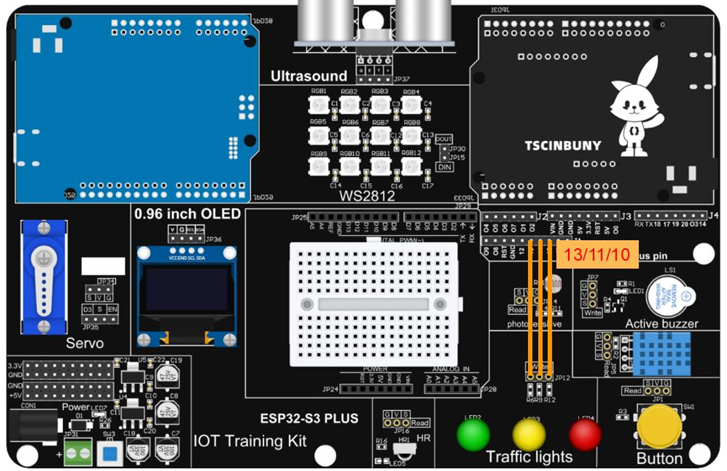 ## 5.4 Upload code
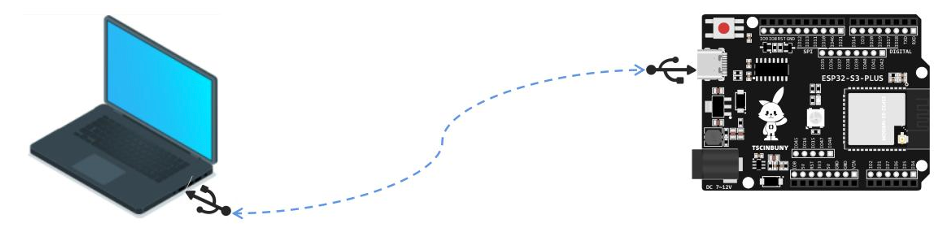
### 5.4.1 Connect the main control board to the computer using a USB cable
## 5.4 Upload code
### 5.4.1 Connect the main control board to the computer using a USB cable
 ### 5.4.2 Open the program file (path: 2_ESP32_S3_PLUS\ Lesson_5_Traffic_light )
Also select the board type as ESP32S3 Dev Module and select the COM number newly displayed when the USB is plugged
in . Then click "Upload" to start compiling and uploading the program to the main control board.
## 5.5 Code analysis
Define three LED pins
```cpp
#define Green 13 // Define the green light pin
#define Yellow 11 // Define the yellow light pin
#define red 10 // Define the red light pin
```
Set pin as output
```cpp
void setup() {
// Define the pin as the output working mode
pinMode(Green, OUTPUT);
pinMode(Yellow, OUTPUT);
pinMode(red, OUTPUT);
}
```
The loop function executes a single light cycle.
The red light first lights up for 5 seconds and then flashes every 500 milliseconds.
```cpp
void loop() {
digitalWrite(Green, HIGH); // Turn on the green light
digitalWrite(Yellow, LOW); // Put out the yellow light
digitalWrite(red, LOW); // Turn off the red light
delay(5000); // Turn on the green light for five seconds
// The green light flashes every 500 milliseconds
digitalWrite(Green, HIGH);
delay(500);
digitalWrite(Green, LOW);
delay(500);
digitalWrite(Green, HIGH);
delay(500);
digitalWrite(Green, LOW);
delay(500);
digitalWrite(Green, HIGH);
delay(500);
```
Yellow light on for 1 second
```cpp
// The yellow light is on for 1 second
digitalWrite(Green, LOW);
digitalWrite(Yellow, HIGH);
digitalWrite(red, LOW);
delay(1200);
```
Finally, the red light turns on for 5 seconds and then flashes every 500 milliseconds
```cpp
// The red light stays on for 5 seconds
digitalWrite(Green, LOW);
digitalWrite(Yellow, LOW);
digitalWrite(red, HIGH);
delay(5000);
// The red light flashes every 500 milliseconds
digitalWrite(red, HIGH);
delay(500);
digitalWrite(red, LOW);
delay(500);
digitalWrite(red, HIGH);
delay(500);
digitalWrite(red, LOW);
delay(500);
digitalWrite(red, HIGH);
delay(500);
```
### 5.4.2 Open the program file (path: 2_ESP32_S3_PLUS\ Lesson_5_Traffic_light )
Also select the board type as ESP32S3 Dev Module and select the COM number newly displayed when the USB is plugged
in . Then click "Upload" to start compiling and uploading the program to the main control board.
## 5.5 Code analysis
Define three LED pins
```cpp
#define Green 13 // Define the green light pin
#define Yellow 11 // Define the yellow light pin
#define red 10 // Define the red light pin
```
Set pin as output
```cpp
void setup() {
// Define the pin as the output working mode
pinMode(Green, OUTPUT);
pinMode(Yellow, OUTPUT);
pinMode(red, OUTPUT);
}
```
The loop function executes a single light cycle.
The red light first lights up for 5 seconds and then flashes every 500 milliseconds.
```cpp
void loop() {
digitalWrite(Green, HIGH); // Turn on the green light
digitalWrite(Yellow, LOW); // Put out the yellow light
digitalWrite(red, LOW); // Turn off the red light
delay(5000); // Turn on the green light for five seconds
// The green light flashes every 500 milliseconds
digitalWrite(Green, HIGH);
delay(500);
digitalWrite(Green, LOW);
delay(500);
digitalWrite(Green, HIGH);
delay(500);
digitalWrite(Green, LOW);
delay(500);
digitalWrite(Green, HIGH);
delay(500);
```
Yellow light on for 1 second
```cpp
// The yellow light is on for 1 second
digitalWrite(Green, LOW);
digitalWrite(Yellow, HIGH);
digitalWrite(red, LOW);
delay(1200);
```
Finally, the red light turns on for 5 seconds and then flashes every 500 milliseconds
```cpp
// The red light stays on for 5 seconds
digitalWrite(Green, LOW);
digitalWrite(Yellow, LOW);
digitalWrite(red, HIGH);
delay(5000);
// The red light flashes every 500 milliseconds
digitalWrite(red, HIGH);
delay(500);
digitalWrite(red, LOW);
delay(500);
digitalWrite(red, HIGH);
delay(500);
digitalWrite(red, LOW);
delay(500);
digitalWrite(red, HIGH);
delay(500);
```