 7d2cf44036
image ling cdn |
||
|---|---|---|
| .. | ||
| Lesson_10_Photoresistor.ino | ||
| README.md | ||
README.md
10. Photoresistor
10.1 Overview
In this section , you will learn how to use a light intensity detection module also called a photoresistor. The photoresistor detects the ambient light intensity and prints it to the serial monitor.
10.2 Working principle
10.2.1 Photoresistor

Aphotoresistor is a resistor made by utilizing the photoelectric effect of semiconductors. The resistance value changes with the intensity of incident light. It is also called a photodetector. When the incident light is strong, the resistance decreases. Whenthe incident light is weak, the resistance increases. . There is another type where the resistance decreases when the incident light is weak and when the incident light is strong, the resistance increases. According to this characteristic, photoresistors with different shapes and irradiation areas can be manufactured. Working principle: Since the carriers generated by illumination participate in conduction and drift under the action of the external electric field, the electrons rush to the positive electrode of the power supply and the holes rush to the negative electrode of the power supply, thus causing the resistance of the photoresistor to drop rapidly. Photoresistors are generally
used for light measurement, light control and photoelectric conversion .
10.3 Connection lines
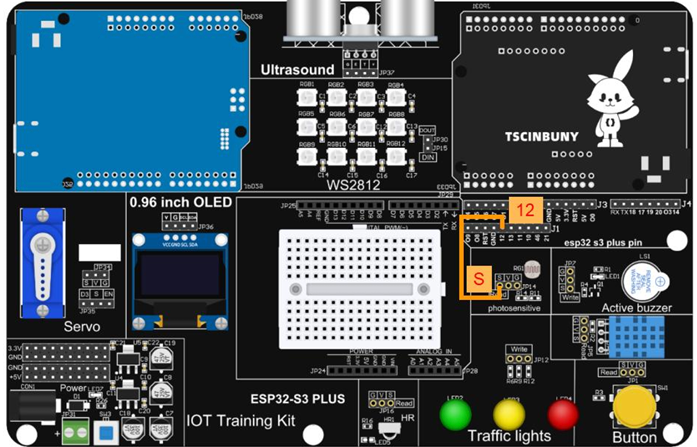
10.4 Upload code program
10.4.1 Connect the main control board to the computer using a USB cable
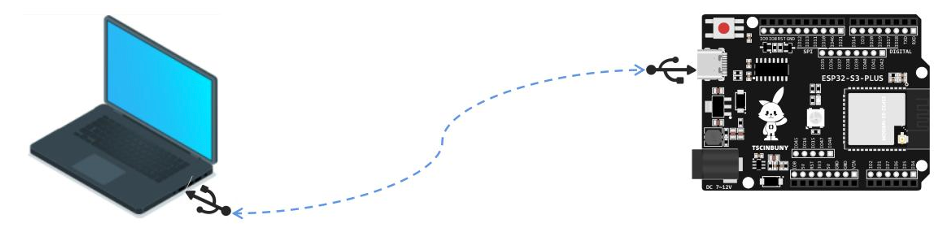
10.4.2 Open the program file (path: 2_ESP32_S3_PLUS \ Lesson_10_Photoresistor )
Also select the board type as ESP32S3 Dev Module and select the COM number newly displayed when the USB is plugged in . Then click "Upload" to start compiling and uploading the program to the main control board, and wait for the program upload to be completed . After the program is uploaded, open the IDE serial port monitor and you can see the printed output light intensity value. Under normal lighting, the value is a maximum of 4095 The detection value is <300 when covering the photoresistor with objects.
10.5 Code analysis
The variable Lightvalue that defines the analog input pin analogInPin of the photoresistor detection module and the light intensity value.
const int analogInPin = 12;  // The photoresistor mimics the input pin
int Lightvalue = 0;          // Defining variables
Set the photosensitive detection module pin as input, baud rate 9600
void setup() {
 Serial.begin(9600);        // Initialize the serial port baud rate
 pinMode(analogInPin,INPUT);
}
The loop function first obtains the simulation value of the light detection module, saves it to a variable and prints it to the serial monitor.
void loop() {
  Lightvalue = analogRead(analogInPin);  // Read the value of light sensitivity
  Serial.print("Lightvalue = ");         // Print the value of light sensitivity through the serial port
  Serial.println(Lightvalue);
  delay(200);
}