 7d2cf44036
image ling cdn |
||
|---|---|---|
| .. | ||
| Lesson_8_Gradient_RGB_light.ino | ||
| README.md | ||
README.md
8. Gradient RGB
8.1. Overview
In this section , you will learn the control of WS2812 in an advanced way to achieve the effect of RGB light gradient .
8.2. Working principle
Use the library function fill_rainbow(leds, NUM_LEDS, hue, 8); to change the gradient display of RGB lights.
8.3 Connection lines
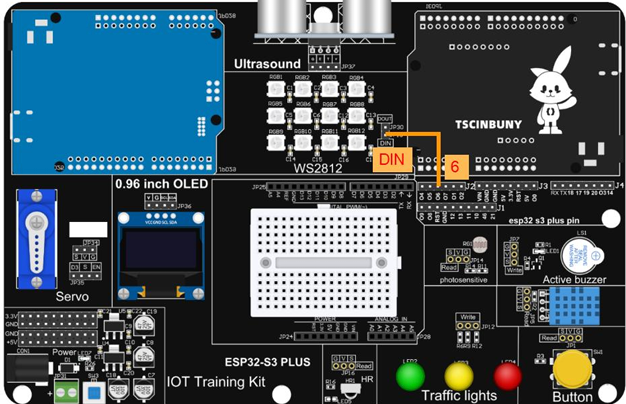
8.4. Upload code program
8.4.1. Connect the main control board to the computer using a USB cable
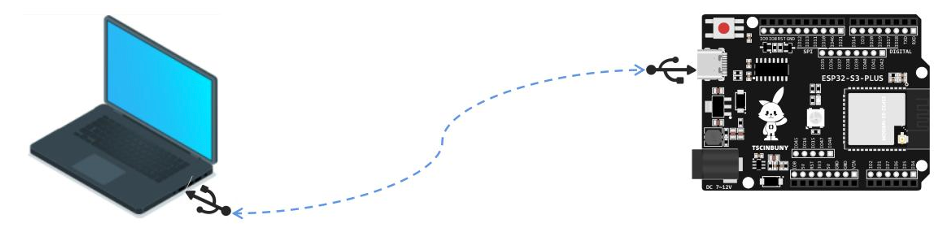
8.4.2 Open the program file (path: 2_ESP32_S3_PLUS\Lesson_8_Gradient_RGB_light)
Also select the board type as ESP32S3 Dev Module and select the COM number newly displayed when the USB is plugged in . Then click "Upload" to start compiling and uploading the program to the main control board, and wait for the program
upload to be completed .
8.5 Code analysis
The declaration library, pin definition and setting part of the code are consistent with the previous section, and then use the fill_rainbow function in the loop function to implement the rainbow color gradient.
void loop() {
  // Gradients display different colors
  for (int hue = 0; hue < 255; hue++) {
    fill_rainbow(leds, NUM_LEDS, hue, 8);
    FastLED.show();
    delay(20);
  }
}